
Introduction
Have you ever asked yourself why some digital products feel instantly comfortable to use while others leave you frustrated and confused? The answer almost always lies in UI/UX design, the backbone of any successful digital product. This isn’t just about how things look; it’s about how they work, how they feel, and how effortlessly they guide users through an experience.
UI (User Interface) and UX (User Experience) design go far beyond mere aesthetics. They are the foundation of how users interact with digital environments. From the moment a person opens an app to the final action they complete, design plays a critical role in shaping that journey. In this comprehensive guide, we’ll explore what UI and UX design truly mean, the difference between them, their roles in product development, and the key skills and principles that make them indispensable in 2025 and beyond.
Key Takeaways
UI and UX are not interchangeable. UI is about the look and layout, while UX focuses on how users feel when interacting with the product.
Collaboration between UI and UX is essential to creating user-centered products that are both beautiful and highly functional.
UI design emphasizes visual hierarchy, brand consistency, interaction patterns, and responsiveness.
UX design emphasizes research, behavioral psychology, usability testing, and accessibility.
Modern UI/UX design is shaped by new technologies like AI, voice interfaces, and augmented reality, yet still relies on timeless principles of clarity, empathy, and simplicity.
What is UI/UX design?
UI and UX design are closely connected, but focus on different parts of the user’s interaction with a product.
UI design refers to the visual layout and interactive elements users engage with on a screen. This includes everything from buttons and forms to colors, typography, and navigation. The goal of UI is to create a visually clear and responsive interface that helps people interact with a product confidently.
UX design is about the overall experience a user has while using a product. It focuses on understanding user behavior, identifying pain points, and designing workflows that are logical and easy to follow. UX considers how information is organized, how users move through a system, and how satisfied they are when completing tasks.
A good UI makes a product look polished, but a strong UX ensures the product works well for the people using it. Together, they help teams build products that are not only functional but also pleasant to use.
What to Know About UI UX Design?
Today, users interact with businesses and their products primarily digitally. Due to this, UI and UX have become increasingly vital in crafting functional and user-friendly products.
Here is what you need to know about UI and UX design;
UI Design
What is UI Design?
UI design refers to the process of designing interfaces that primarily focus on looks and style. It involves designing everything a person sees and clicks or taps on, from navigation menus and page layouts to icons, buttons, and typography. UI design helps users understand where they are, what they can do next, and how to accomplish tasks quickly.
Why is UI Design Important?
First impressions matter, especially in digital products. The interface is often the first thing users experience, and a well-designed UI can encourage trust and engagement right from the start.
When users can quickly understand how to use a product and feel comfortable navigating through it, they’re more likely to stay, complete tasks, and return. A strong UI also reduces friction, lowers the learning curve, and enhances the overall perception of the product.
What Do UI Design Services Offer?
UI design services provide a variety of solutions that focus on helping products look and feel consistent, clean, and easy to use. These include:
Custom Interface Design – Creating unique and brand-aligned screens and layouts that enhance user engagement.
Responsive Design Systems – Ensuring seamless functionality and visual consistency across devices, browsers, and screen sizes.
Design System Development – Building reusable components and design patterns to streamline development and maintain consistency.
Microinteraction Design – Enhancing user actions with engaging animations and feedback (e.g., hover effects, loading animations, etc.).
Accessibility Optimization – Designing inclusive experiences that comply with accessibility standards such as WCAG 2.1.
UI Audits & Redesigns – Analyzing existing interfaces to identify friction points and improve performance and visual flow.
What are UI Design Principles?
To ensure high usability and visual harmony, UI designers rely on well-established principles. According to the Nielsen Norman Group’s 10 Usability Heuristics, good UI must include:
- Consistency & Standards – Familiarity across screens reduces the learning curve and errors.
- Visibility of System Status – Keep users informed through feedback and visual cues.
- User Control & Freedom – Let users undo or navigate easily without getting stuck.
- Recognition Over Recall – Show options clearly rather than relying on users’ memory.
- Aesthetic & Minimalist Design – Avoid visual clutter to emphasize key actions.
- Error Prevention & Recovery – Prevent mistakes and help users fix them if they occur.
- Flexibility & Efficiency – Provide shortcuts for expert users while keeping it simple for beginners.
Each principle contributes to building intuitive, seamless interfaces that reduce cognitive load and improve the overall experience.
What does a UI designer do?
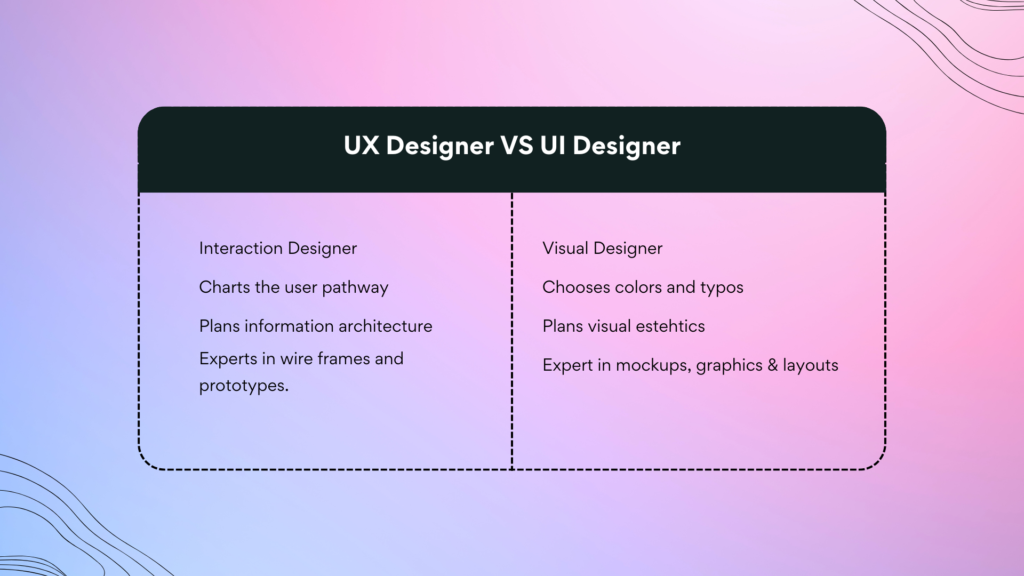
A UI designer is responsible for translating product requirements and UX strategy into a clear, attractive, and user-friendly interface. They collaborate with UX designers, developers, and product managers to ensure the design is visually aligned with the user journey.
Key responsibilities include:
- Designing High-Fidelity Interfaces – Using tools like Figma, Sketch, or Adobe XD to create pixel-perfect screens.
- Establishing Visual Hierarchies – Guiding user attention through spacing, color, and typography.
- Maintaining Brand Consistency – Ensuring that all UI elements follow a unified design language and brand guidelines.
- Creating Design Assets & Iconography – Developing reusable assets for rapid prototyping and handoff.
- Collaborating on Design Systems – Building modular UI components for scale and maintainability.
What are the Skills Required for UI Design?
To succeed in UI design, a designer needs a combination of creative, technical, and collaborative skills:
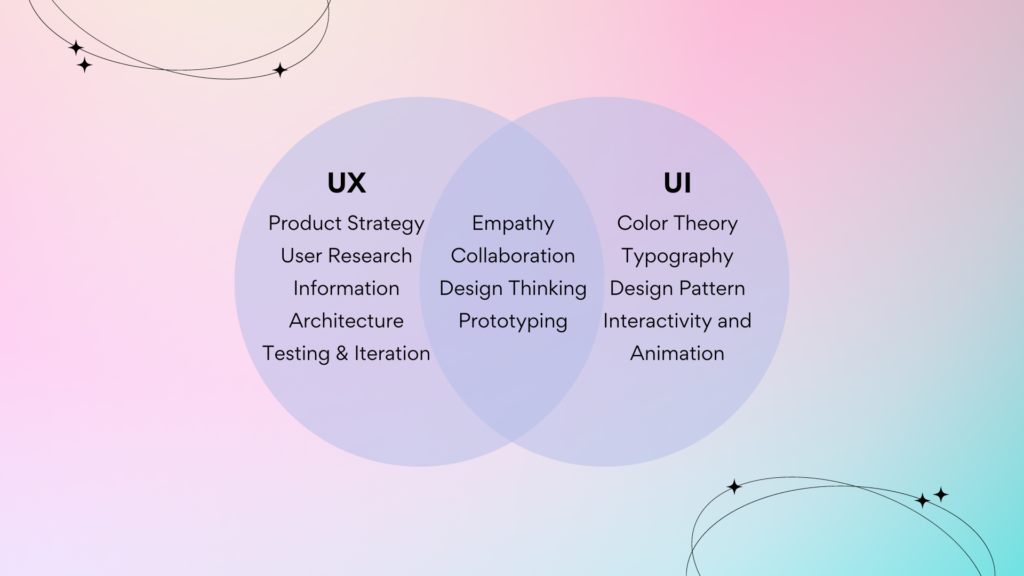
Visual Design Fundamentals –Understanding of color theory, typography, and layout.
Proficiency in Design Tools – Proficiency in Figma, Adobe XD, Sketch, Illustrator, and prototyping tools like InVision.
Interactive Design – Understanding how to design functional components like toggles, sliders, and dropdowns.
Attention to Detail – Ensuring pixel-perfect execution and alignment across components.
Accessibility & Responsiveness – Designing for users with disabilities and across device types.
Basic Front-End Awareness – Familiarity with HTML, CSS, and component-based frameworks like React can help in working with developers.
UX Design
What is UX Design?
UX design is the process of designing products that provide meaningful and relevant experiences to users. It involves studying how people interact with a product and designing the structure, flows, and feedback to guide them through tasks without confusion.
A UX designer strives to remove friction and ensure that every step of a user’s journey, from onboarding to feature discovery, feels logical and purposeful. They combine user research with design thinking to create experiences that make sense and deliver real value.
Why is UX Design Important?
UX design is essential because it addresses how users think, behave, and feel while using a product. A product that is visually appealing but hard to use will frustrate users. In competitive markets, UX is often what sets one product apart from another. It improves satisfaction, reduces support costs, and drives better business results by helping users get more done with less effort.
A strong UX leads to:
- Higher conversion rates
- Lower churn
- Increased customer satisfaction
- Stronger word-of-mouth referrals
- Reduced support requests
What Do UX Design Services Offer?
UX design services provide end-to-end support to improve how users interact with a product. These services include:
UX Audits – Analyzing current experiences and recommending improvements.
User Research & Testing – Understanding users through interviews, surveys, and usability tests.
Persona Development – Creating detailed user profiles to guide design decisions.
Journey Mapping – Visualizing how users move through the product and identifying pain points.
Wireframing – Sketching out the structure and layout before diving into visual design.
Prototyping – Building clickable models to test functionality and flow before development.
Information Architecture – Organizing content and features so users can easily find what they need.
What are UX Design Principles?
Great UX design adheres to well-established principles that focus on user satisfaction, clarity, and efficiency. As outlined in the Laws of UX, foundational principles include:
Hick’s Law – Minimize decision time by simplifying choices.
Fitts’s Law – Place key actions in easy-to-reach areas.
Jakob’s Law – Users prefer interfaces similar to what they already know.
Aesthetic-Usability Effect – Beautiful designs are perceived as easier to use.
Tesler’s Law – Simplify complexity; don’t push it onto the user.
Miller’s Law – Reduce cognitive overload by chunking information.
These principles guide UX designers to create systems that reduce effort, increase clarity, and deliver a fulfilling experience.
What does a UX designer do?
UX designers focus on optimizing how users interact with a product by making sure it’s functional, accessible, and aligned with real user goals. Their day-to-day responsibilities include:
Conducting A/B Testing & Iteration – Continuously improving products based on data.
Conducting User Research – Surveys, interviews, and observations to understand behavior.
Defining User Personas & Flows – Creating documentation to inform design decisions.
Developing Wireframes & Prototypes – Mapping out structure before visual design begins.
Collaborating with Stakeholders – Ensuring alignment between business, tech, and user needs.
What are the Skills Required for UX Design?
UX designers need a well-rounded skill set that spans research, design, collaboration, and strategy. Key skills include:
Cross-Team Communication – Sharing ideas and collaborating with developers, marketers, and stakeholders.
User Research – Collecting and analyzing user data to uncover insights.
Interaction Design – Mapping flows and structuring tasks logically.
Prototyping Tools – Using Figma, Adobe XD, Axure, or similar tools to test designs.
Wireframing & IA – Organizing content and defining structure for clarity and navigation.
Empathy & Problem-Solving – Understanding user needs and thinking critically about how to solve their challenges.
Analytics & Testing – Measuring success and refining experiences based on real-world feedback.
Why is UI/UX Design Important?
In today’s hyper-competitive digital world, the strength of a product’s design can determine whether it flourishes or fails. UI/UX design ensures that products are both enjoyable to use and capable of achieving their intended goals.
A well-designed product delivers more than the visible layout, it delivers clarity, purpose, and value. It leads users exactly where they want to go, removes unnecessary complexity, and turns casual visitors into loyal customers.
The Relationship Between UI and UX
UI and UX might sound like buzzwords, but they’re just two sides of the same coin. UX is about how something works: how easy it is to get from point A to point B, how logical the steps feel, and whether or not it’s a smooth experience. UI is what you see while doing all of that: the layout, the buttons, the visuals, the way things move when you click.
They do different jobs, but they rely on each other. A solid user experience isn’t much use if the interface looks confusing or outdated. And a beautiful interface can’t save a product that’s frustrating to use. When they’re done right, people barely even notice. They just move through the product naturally, without having to stop and think.
What is the Difference Between UI and UX Design?
Although UI and UX work hand-in-hand, they approach things from different angles:
● UX design is focused on the overall experience, while UI focuses on specific components that enhance the user experience.
UX design covers everything from initial discovery through completion of a task. It includes research, strategy, and behavior mapping. UI focuses specifically on what users see and interact with during that experience: layouts, colors, typography, and controls.
● UX defines structure and interaction, UI shapes appearance and behavior.
UX determines how users move through the product, where decisions happen, and what paths are available. UI interprets that structure into buttons, fields, menus, and layouts that make interaction possible.
● UX is about solving user problems; UI is about guiding and delighting users visually.
UX is all about user research and problem-solving. UI focuses on clear communication, consistency, and visual hierarchy that helps users complete tasks confidently.
● UX shapes the journey, UI defines the experience at each step.
UX maps the entire user journey from onboarding, engagement, conversion, and beyond. UI makes each moment along that journey visually understandable and engaging.
What are the Similarities Between UI and UX Design?
Despite their different responsibilities, UI and UX share several key qualities:
● Both are user-centered.
At the heart of both disciplines is the user. UI and UX designers base decisions on research, usability data, and empathy for real-world needs, not personal preferences or assumptions.
● They both aim to improve usability.
Whether by refining button placement or simplifying a workflow, both UI and UX focus on making interactions smoother, faster, and more satisfying.
● Each follows an iterative, research-driven process.
Design is never one-and-done. UI and UX teams prototype, test, collect feedback, and revise often multiple times, to create the best experience possible.
● They rely on strong attention to detail.
Success lies in the small things: the spacing between elements, the way a modal appears, or how error messages are displayed. These micro decisions add up to a seamless experience.
● Clear communication and collaboration are essential.
Designers must convey complex ideas through wireframes, prototypes, user flows, and presentations, and align with stakeholders across design, development, and business teams.
● They must work together, not in silos.
A UX plan without UI implementation remains abstract, and a visually pleasing UI without UX planning can confuse users. When both are aligned, the result is a clear, efficient, and delightful product.
How Do UX and UI Design Work Together?
The design process typically begins with UX. Designers start by researching users, understanding their goals, and mapping out interactions through wireframes and journey maps. This creates the structure for what the product should do, how users will flow through it, and what problems the experience must solve.
UI designers then take those insights and transform them into visual and interactive solutions. They build layout grids, define color schemes, establish visual hierarchy, and create responsive design systems that support both usability and aesthetics.
Throughout development, both UI and UX work together to test assumptions, iterate based on real-world feedback, and adjust the experience as needed. It’s a continuous loop of insight, design, and refinement. Misalignment between the two can result in inconsistent experiences, but when done right, users don’t even notice the design; they simply use the product with confidence.
Challenges in UI/UX Design
Even experienced teams face challenges when building great user experiences. Here are some of the most common issues:
Working under tight deadlines
Fast-paced development cycles often limit the time available for research and testing. This can lead to rushed decisions, overlooked usability issues, and inconsistent user flows.
Lack of direct user feedback
Without engaging real users through interviews or usability tests, designers may rely on assumptions that miss key pain points or needs.
Insufficient knowledge of the target audience
Designing without a clear understanding of who the users are can result in products that feel disconnected from actual behaviors, preferences, or expectations.
Overcomplicating features or workflows
As features accumulate, it’s easy for products to become bloated or difficult to navigate. UX designers must simplify without reducing functionality, and UI designers must present features in a way that feels accessible.
Prioritizing visual design over usability
A sleek interface means little if users can’t find what they need. Teams should never sacrifice function for form, or rush to launch without validating the experience.
Future of UI/UX Design
The field of UI/UX design is evolving rapidly. New technologies like artificial intelligence (AI), voice interfaces, augmented reality (AR), and virtual reality (VR) are introducing fresh challenges and opportunities. Tools are becoming more advanced, and users expect faster, smarter, and more personalized experiences than ever before.
Designers will need to adapt by embracing emerging tools while staying rooted in timeless UX principles like clarity, consistency, and empathy. They’ll need to balance innovation with accessibility and ensure that complexity doesn’t come at the cost of usability.
In short, the future of UI/UX design will be shaped by both technological progress and human needs, and the best design teams will be those that keep the user at the center, no matter how advanced the technology becomes.
FAQs
What is UI UX design in simple words?
UI/UX design is about creating interfaces that are easy to use and pleasant to interact with. UI focuses on how things look, while UX focuses on how they work.
Is UX design the same as UI design?
No. UX is about the full experience of using a product, including structure, usability, and flow. UI is about the visuals and layout that support that experience.
Is UI UX Design the Same as Web Design?
Not exactly. Web design is limited to websites, while UI/UX design applies to all digital interfaces, including mobile apps, desktop software, smart devices, and more.
Is UX/UI design hard to learn?
It can be challenging due to the variety of skills involved, including research, interaction design, and visual design, but it’s absolutely achievable with practice and the right resources.
Does UI UX require coding?
Not necessarily, but having a basic understanding of HTML, CSS, or JavaScript can help designers communicate more effectively with developers.
Should I focus on UI design or UX design?
It depends on your interests. If you enjoy visuals, layout, and branding, UI may suit you better. If you prefer research, problem-solving, and structuring user flows, UX might be a better fit.
Conclusion
UI and UX design are critical to building digital products that people trust, enjoy, and keep using. While UI shapes the way a product looks and responds visually, UX ensures that the structure and flow of the experience make sense from the user’s perspective.
The most effective digital products are built through the collaboration of both UI and UX, grounded in real-world research, tested with users, and refined through iteration. As technology continues to evolve, the core mission of UI/UX design remains the same: to put users first, solve real problems, and create experiences that feel effortless.
Bilzimo is a design agency that puts users first. Our UI design services ensure clean, accessible, and visually consistent interfaces. Our UX design services focus on structure, strategy, and usability — helping you build experiences that don’t just look good but work seamlessly.
Ready to elevate your product with expert UI/UX design?
Let’s talk — Contact us today to get started.