

The world of design keeps on evolving. Every year, there’s a new wave of ideas, shifts in user behavior, and tech upgrades that reshape how we think about creating better digital experiences. And in 2025, UI UX trends are taking another big step forward. From smarter personalization to more human-centered visuals, the future is more focused than ever on user expectations.
If you’re a designer, product owner, or working with a web design agency, staying ahead of these shifts is non-negotiable. Falling behind means delivering clunky experiences while your competitors win people over with smoother, smarter designs. In this article, we’re breaking down the UI/UX Design Trends in 2025 that you seriously can’t afford to ignore.
1. Emotion-Driven Interfaces
Design is no longer just about function, but it’s also about how it makes people feel. In 2025, UI/UX Design Trends will focus more on emotion-led interfaces that do more than just help users complete tasks. These interfaces aim to build a real connection, creating small but meaningful moments throughout the journey.
That can look like:
- A checkmark with a satisfying animation after finishing a to-do list
- A progress bar that celebrates small wins
- Mood-based color shifts depending on the time of day or user choices
These features seem small on the surface, but they can shape how a user remembers the product. Emotionally aware design encourages users to keep coming back because it feels good to interact with the product.

A great example is Duolingo, which uses cheerful animations, positive reinforcement, and a mascot with personality to make language learning feel encouraging instead of stressful.
People return to what feels rewarding. Building emotion into your UI increases satisfaction, boosts retention, and turns users into advocates.
2. Smarter Microinteractions
Microinteractions are those small, almost invisible details that make a digital experience feel polished. You’ve seen them before: a subtle hover effect on a button, a loading spinner that shows progress, or a toggle switch that animates with a sound effect.
In 2025, these aren’t just decorative. They’re smarter, more responsive, and more useful than ever.
Designers are using them to:
- Offer real-time system feedback (like “form submitted successfully” alerts)
- Enhance accessibility (like subtle cues for screen reader compatibility)
- Clarify user actions (like a heart that pulses when liked)
When done correctly, they eliminate friction, reduce hesitation, and enable users to navigate with confidence. And they’re not just for fancy apps. Even B2B tools and enterprise dashboards are adopting microinteractions to create cleaner, more intuitive interfaces.
For instance, Slack uses microinteractions to show message statuses and channel activity, improving usability without overwhelming users.
3. Native-Looking Web App
More websites are functioning like apps, and this trend will continue growing in 2025. Progressive Web Apps (PWAs) are leading this shift. They look and feel like native apps but run in a browser, offering features like push notifications, offline access, and smooth transitions.
The result? Sites that are lightning fast, reliable even on poor connections, and responsive to user actions.
If you’re building a platform from scratch or revamping your digital product, you should seriously consider this model. Not only do PWAs load faster, but they also provide seamless cross-device experiences.
For example, Pinterest saw a 40% increase in user engagement after launching its PWA, thanks to better load speeds and smoother functionality.
Users expect every experience, whether mobile or desktop, to work smoothly. Websites that mimic native functionality keep users engaged longer and encourage repeat visits.
4. AI-Integrated Interfaces
Artificial intelligence has moved far beyond being a trend; it’s now embedded into how users interact with digital products every day. In 2025, AI is being used more intelligently across UI/UX design, not just as a flashy feature, but as a tool for real personalization and support.
Here’s how AI is improving UI/UX:
- Smarter search experiences: Platforms like Notion utilize AI to surface the most relevant notes and documents, eliminating the need for users to manually search.
- Predictive suggestions: E-commerce platforms use AI to recommend products based on recent browsing.
- Voice and chat interfaces: AI-powered chatbots are now capable of solving real customer issues instead of delivering scripted responses.
When used effectively, AI feels like an invisible helping hand, anticipating what the user wants and offering it without requiring effort.
Take Spotify, for example. Its AI doesn’t just build playlists; it understands what kind of music you want on a Monday morning versus a Saturday night. That keeps users engaged on a personal level.
Make sure your website design approach includes room for AI features early on. Let the design team know you’re open to AI-powered features so they can tailor the layout and navigation accordingly.
5. Scroll-Based Storytelling
Today’s users aren’t interested in flipping through static pages that look and feel the same. They want movement, progression, and something to keep them engaged beyond just reading text. That’s where scroll-based storytelling comes in, and in 2025, it’s becoming a top trend across websites and product experiences.
Instead of a typical click-to-continue layout, scroll-triggered storytelling allows users to naturally progress through content as they move down the page. As they scroll, text may fade in, graphics shift or zoom, background colors evolve, and new visual scenes appear, turning an ordinary product page into a guided narrative.
This technique is especially popular on:
- High-end product launch pages
- Portfolio sites for designers or agencies
- Nonprofit websites aiming to communicate impact
- Brand storytelling campaigns with emotional hooks
Take a look at Apple’s AirPods Pro product page. As you scroll, new sections glide in, each showcasing a feature with clean animations and bold visuals. It doesn’t just show the product, it sells the experience.
Scroll-based storytelling encourages users to stay longer and scroll deeper. It removes friction and replaces traditional “next page” interactions with something more seamless and immersive. If you’re working with a web design agency, ask them how they plan to map user journeys visually to help you understand better.
6. Accessibility-First Approach
Making your product usable for everyone shouldn’t be a last-minute task. In 2025, accessibility is an integral part of the UI/UX strategy from the very beginning.
Designers are now building with inclusivity in mind, making sure users with disabilities can navigate, read, interact, and complete actions just as easily as anyone else. This means following standards like the Web Content Accessibility Guidelines (WCAG) and incorporating features that benefit everyone, including:
- Proper contrast between background and text
- Keyboard-friendly navigation
- Alternative text for images
- Logical heading structure
- Clear labels for buttons and form inputs
And here’s the kicker: accessible design often results in a better experience for all users, not just those with impairments. Features such as larger tap targets, readable font sizes, and voice-assisted navigation tools enhance usability for everyone, particularly on mobile devices.
Government sites, educational platforms, and healthcare providers are legally required to meet accessibility standards. But even commercial brands are embracing it as a core principle. Microsoft’s inclusive design approach is a great example of leading by doing.
If you’re hiring a web design agency, ask if they conduct accessibility audits or build with tools like WAVE to check for errors. Accessibility isn’t just a good thing to do; it’s good for business.
7. 3D Visuals and Interactive Elements

Flat design has had its moment. In 2025, we’re seeing a rise in interfaces that incorporate subtle 3D visuals, interactive components, and spatial layouts, which provide the user with a sense of depth.
Thanks to tools like Spline and Three.js, 3D design is no longer reserved for gaming or advanced motion graphics. Designers are integrating 3D directly into interfaces in ways that are useful and engaging, without overwhelming the user.
Here’s how 3D is being used in today’s interfaces:
- Interactive product models that spin or zoom
- Layered effects that follow cursor movement
- Floating cards and menus that simulate depth
- Hover-triggered animations to encourage engagement
Visit Nike’s product pages and you’ll see rotating shoe models that users can view from multiple angles. It’s not just flashy, it helps the user make a better buying decision.
Adding dimension enhances the interface’s feel. It turns flat surfaces into dynamic experiences, which increases engagement and dwell time. When executed with restraint and purpose, 3D visuals can elevate a design from good to great.
8. Content-First Layouts
One of the most meaningful UI/UX Design Trends in 2025 is the shift toward content-first design. In the past, designers often created a layout and filled it in later. But this approach rarely works well when the actual content doesn’t fit the mold.
Now, more designers are starting with content. Whether it’s a powerful message, a long-form article, or a product description that matters, the layout is designed around how the content flows and what it needs to say.
This approach is especially useful for:
- Blogs and media sites
- SaaS product documentation
- Landing pages with storytelling elements
- Case studies and resource hub

The best example of content-first design is Medium. The interface is clean and distraction-free, allowing the words to shine through. Every design choice supports reading and comprehension.
A content-first layout is flexible, mobile-friendly, and scalable. It’s built with real headlines, real blocks of text, and real use cases in mind. It’s also great for SEO because it prioritizes meaningful structure over decorative fluff.
If you’re working with a web design agency, make sure they ask for your content (or at least a draft of it) early in the process. Good design should serve the message, not the other way around.
9. Data-Backed Design Decisions
In 2025, the best UI UX decisions are backed by data, not just personal taste or client preferences. With tools like heatmaps, user recordings, and conversion tracking, designers are shaping interfaces based on how real users interact with them.
This shift toward evidence-based design means:
- Knowing exactly where users are clicking or not clicking
- Identifying which elements slow people down or cause frustration
- Testing different versions of a button, headline, or form to see which performs better
Platforms like Hotjar and Crazy Egg are widely used to collect visual data like scroll depth, heatmaps, and user paths. And tools like Google Optimize or VWO allow teams to A/B test design elements before committing to them.
For example, if users are abandoning their cart during checkout, you can analyze session replays to see where they drop off. It might be something small, like a confusing field label or an unclear shipping fee.
Making design decisions based on actual user behavior helps you avoid costly mistakes. Instead of launching a full redesign and hoping for the best, you can test, tweak, and improve based on what the data tells you.
If you’re working with a web design agency, ensure they offer CRO (Conversion Rate Optimization) as part of their services. It shows they’re not just designing, they’re aiming to grow your business.
10. Purposeful Animations, Not Just Decoration
Animations used to be flashy effects that made things look cool. But in 2025, they serve a purpose: to guide the user, explain interactions, and remove uncertainty.

Purposeful animations help with:
- Drawing attention to an important action (like a CTA gently pulsing)
- Providing feedback after a click (like a checkmark confirming success)
- Indicating system status (like a progress bar showing how long something takes)
Instead of using animation as a visual gimmick, designers are now asking: “What problem is this solving?”
Take Google Material Design as an example. Their motion principles show how animation can clarify hierarchy, signal interactivity, and create spatial awareness.
Examples of purposeful animation include:
- Form fields shaking slightly to indicate an error
- Loaders that fill up to show time progress
- Menus that smoothly slide open or fade in to show hierarchy
Animation should enhance the user’s understanding, not confuse them. The goal is to make everything feel more responsive, more human, and more intuitive. If your animation doesn’t explain, guide, or reassure, it probably doesn’t belong in the design.
11. Minimalism Designs
Minimalist design is here to stay, but it’s evolving. In 2025, minimalism isn’t just about whitespace and sans-serif fonts. It’s about stripping away distractions while adding bold, unexpected elements that reflect a brand’s personality.
This new approach includes:
- Clean layouts with strong visual hierarchy
- Bold typography that doubles as a design feature
- Splashes of vibrant color used sparingly but powerfully
- Oversized product images or icons that steal the spotlight
Minimalist interfaces now embrace contrast and intentional tension to keep things fresh. Rather than playing it safe, brands are finding subtle ways to stand out, without overwhelming users.
You’ll see this trend across:
- Tech startups that want to feel lean but cutting-edge
- SaaS platforms where clarity and usability matter most
- Personal portfolios and creative agency websites
A strong example of this trend is Stripe, whose design balances whitespace with sharp typography, simple illustrations, and perfectly timed animations.
Use a minimalist structure to give users room to breathe, but don’t be afraid to highlight your brand personality through unique typography, playful color, or signature UI elements.
12. Community-Centered UX
Users don’t just want to use your product; they want to be part of something. In 2025, UI/UX Design Trends are leaning heavily into community-building, where the interface encourages connection, conversation, and contribution.
This is especially popular in industries like:
- E-learning platforms, where students can connect and discuss
- E-commerce brands that include reviews, Q&A, and user-curated collections
- Productivity tools with social features like leaderboards or team spaces
Instead of passive usage, modern platforms are inviting users to participate. This shift is supported by features like:
- Embedded discussion threads
- Personalized user dashboards with shared spaces
- Badges, ranks, or achievement displays
- Social feeds with user-generated content
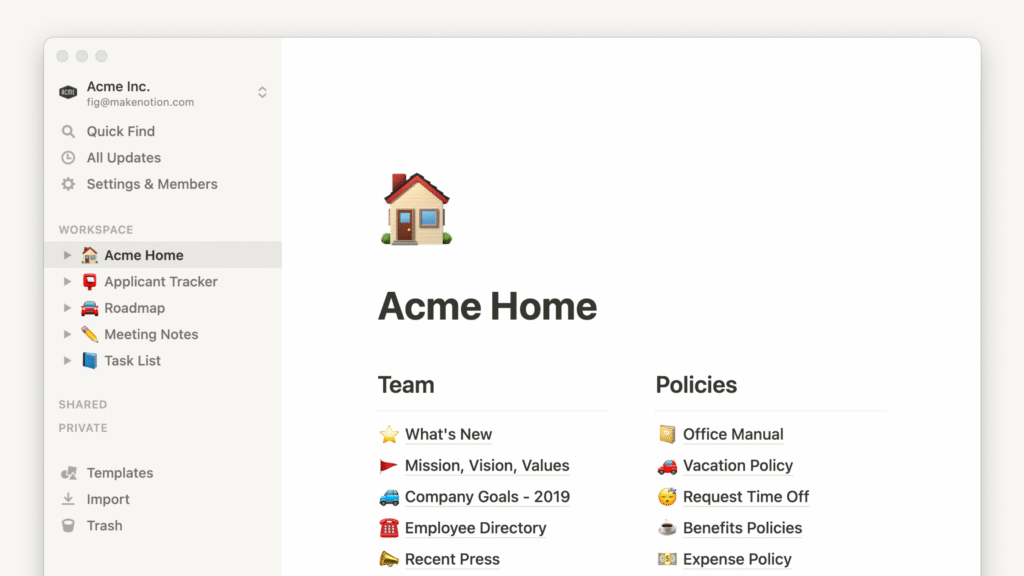
Think of platforms like Notion or Figma. They’ve built strong communities not just through content, but through product design that supports collaboration and visibility.
Why it works:
- People are more likely to stick around when they feel seen
- Community features increase user retention through social interaction
- It turns customers into brand advocates by giving them a voice
If you’re launching a product or platform, consider integrating small community touchpoints, whether that’s a simple feedback board or a dedicated community tab. A web design agency with product experience can help build these features without compromising performance.
Keeping up with UI/UX Design Trends is no longer optional. Whether you’re launching a new SaaS platform, refreshing your e-commerce site, or simply looking to improve user retention, great design plays a key role in how your audience connects with your brand.
These trends from emotion-driven interfaces and AI integration to accessible layouts and ethical UX aren’t just design preferences. They’re strategic decisions that impact how your users behave, how long they stay, and how often they return.
If you’re serious about leveling up your website design, don’t try to chase trends on your own. Partner with a web design agency that understands these shifts and can help you apply them where they’ll have the most impact.
UI/UX Design Trends in 2025 are all about designing for humans, not just users. The more you prioritize clarity, accessibility, and personalization, the better your results will be.